2013/04/04

Two column nomenclature in LyX


(Source: http://tex.stackexchange.com/questions/81631/two-column-nomenclature-breaks-ability-to-have-sub-floats)

To generate two column nomenclature, include the following settings in LyX LaTeX Preamble:


% Two column nomenclature ========================
\usepackage{multicol}

\makeatletter
\@ifundefined{chapter}
{\def\wilh@nomsection{section}}
{\def\wilh@nomsection{chapter}}

\def\thenomenclature{%
\begin{multicols}{2}[%
\csname\wilh@nomsection\endcsname*{\nomname}
\if@intoc\addcontentsline{toc}{\wilh@nomsection}{\nomname}\fi
\nompreamble]
\list{}{%
\labelwidth\nom@tempdim
\leftmargin\labelwidth
\advance\leftmargin\labelsep
\itemsep\nomitemsep
\let\makelabel\nomlabel}%
}
\def\endthenomenclature{%
\endlist
\end{multicols}
\nompostamble}
\makeatother

% Two column nomenclature ========================

2013/04/01

"pdflatex" problem when using "ipe" on Mac

Ipe can be installed on Mac by using MacPorts .

But when I use latex equations in Ipe, it says "An error occurred during the Pdflatex run"

This is simply because "pdflatex" is not in system path, although some latex editors can find it by themselves.

Solve the problem by adding the path of "pdflatex" in .profile file. In my computer pdflatex is located at "/usr/texbin/", so simply add the following line in .profile:

export PATH=/usr/texbin/:$PATH  

2013/01/13

Enable the global terminal colors in Mac Mountain Lion

Simply add the following two line to ".profile"


export CLICOLOR=1
export LSCOLORS=GxFxCxDxBxegedabagaced

CLICOLOR=1 simply enables coloring of your terminal.
LSCOLORS=... specifies how to color specific items.

"Emacs basics: Changing the background color" by Sacha Chua

From: http://sachachua.com/blog/2009/01/emacs-basics-changing-the-background-color/

To change the background color and other attributes, use the command M-x customize-face, and specify default as the face to customize. Change the attributes and the sample text will reflect your settings. When you are satisfied, select Save for future sessions. Your changes will be saved to ~/.emacs and reloaded the next time you start the editor.

2012/07/31

DNS code ready

With Ciarán's help, the RocfloCM code works today on Lindgren! The encountered problems these days are solve by adding one line to the .bashrc file:
_______________________________________

# Modules
module load intel/12.1.5


# MPI
export PATH="/cfs/nobackup/c/chenyang/mpi/ifort1215_gcc434/bin:$PATH"


# Endian
export F_UFMTENDIAN=big
_______________________________________


Or the following messages pop up when run ./rocflocm


chenyang@emil-login2:~/nobackup/rocflocm/genx_v11.05/test>
/afs/nada.kth.se/home/w/u1y2wtkw/nobackup/rocflocm/genx_v11.05/Codes/bin/rocflocm

RFLOCM: All processors ready.
RFLOCM: WARNING :: USING HACK for MPI2 open, read, close in
ModParam.f90.  Check your results! <<<<<<<<
RFLOCM: Successfully opened "rocflocm.inp"
RFLOCM: Initializing global data done.
RFLOCM: Decomposing domain.
forrtl: severe (39): error during read, unit 10, file
/cfs/klemming/nobackup/c/chenyang/rocflocm/genx_v11.05/test/sqr.xyz
Image              PC                Routine            Line        Source
libintlc.so.5      00007FD16B2AAA7A  Unknown               Unknown  Unknown
libintlc.so.5      00007FD16B2A9576  Unknown               Unknown  Unknown
libifcoremt.so.5   00007FD16B9855FC  Unknown               Unknown  Unknown
libifcoremt.so.5   00007FD16B8F4392  Unknown               Unknown  Unknown
libifcoremt.so.5   00007FD16B8F37F9  Unknown               Unknown  Unknown
libifcoremt.so.5   00007FD16B92C23D  Unknown               Unknown  Unknown
rocflocm           000000000071A35F  Unknown               Unknown  Unknown
rocflocm           00000000007094D5  Unknown               Unknown  Unknown
rocflocm           00000000004780EC  Unknown               Unknown  Unknown
rocflocm           0000000000477B9C  Unknown               Unknown  Unknown
libc.so.6          00007FD168EB0BC6  Unknown               Unknown  Unknown
rocflocm           0000000000415B29  Unknown               Unknown  Unknown

2012/03/31

My first iOS application


Another long time since last post. I've just decided (and been able) to dig into programming iPhone/iPad apps after getting my new MacBook Pro on my desk:)

The best learning resource would be the one given by Paul Hegarty on iTuneU (http://itunes.apple.com/itunes-u/ipad-iphone-application-development/id473757255). I have been following the lecture since March 20 (this month). Today I finished the first demonstration code that is required for Home assignment 1. Although it is not completely designed by me, I still feel happy to see the program running on iPhone (simulator). I try to start the home assignment 1 asap.

2011/06/26

Arduino on the go


Finally I got a suitable USB cable for Arduino. You can see the LED is on, it's blinking!

2011/06/21

Boundary condition in Finite different scheme

It's time to keep track of my progress in PhD program.

While solving the 1-D in duct problem with finite different (FD) scheme (please go to the project page for more accurate detail: http://acoubulence.zxq.net/), implementing the boundary condition, as well as the numerical integral, is a tricky part to such a beginner like me.

The homogeneous Dirichlet condition is sort of easier to make; but the homogeneous Dirichlet condition at the center of the duct is not that straightforward. Since the FD scheme I am using now is central FD, an extrapolated point is set to describe the derivative of the center point, but the calculated results were incorrect.

After talking with Ardeshir I am going to use forward difference at the center point instead. Actually I am still curious about what the results will look like if using two FD scheme in one simulation. I will try to show the results (hope are positive ones) in the next post.

2011/03/28

Running Ubuntu on Compaq CQ61

So you thought Linux works with every piece of hardware these days? Sorry, hardware vendors still don't pay much attention when it comes to enable their stuff correctly on the platform. I wont go in to a religious flame-war telling who's fault that is. We can probably blame the Linux community and the hardware industry equally. In this post:

  • Getting the Nvidia G103M graphics card working on Ubuntu 9.10
  • Getting speaker sound to work on the Compaq CQ61

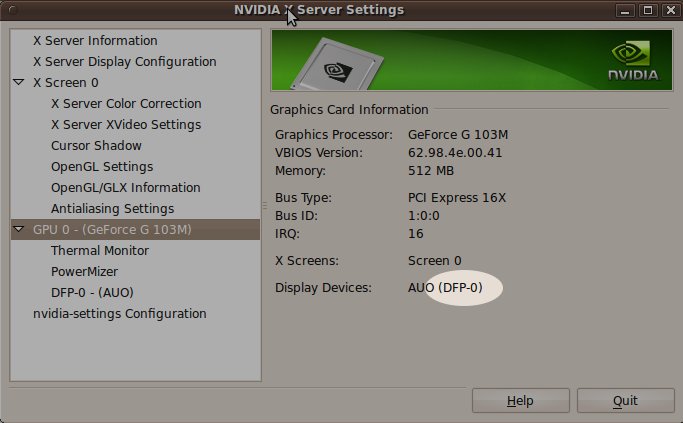
Problem target: Compaq CQ61 with the graphics card Nvidia GeForce G 103 M where graphics card is not automatically identified in Ubuntu 9.04 Problem solution: The following solution works for me, but I take no responsibility nor making guarantees that it works in your case. Credits to zibuntu in the Ubuntu community for providing the binary file that actually solves the problem "under the hood". To start with, the typical symptom looks like this: You may have different results with this computer model depending on which Linux distro you try out. Some distros will not work at all, but Ubuntu 9.04 will at least give you a working environment, but not fully utilize screen resolution and colors. You will also have problems with applications, as your Ubuntu apparently don't really know the actual size of your screen. Nvidia provides some drivers that are supposed to work, but if you run a simple manual installation you will end up with 6 small screens. Not good. Since it is a manual installation, basic users may be stuck and dont know how to reverse. zibuntu have a post in the Ubuntu forum that solves the problem. Heres the short story on how to solve the problems:

  1. As of Ubuntu 9.10 (currently in beta phase), your graphics card will be detected and you will be offered a "restricted driver" via the menu. Go to >System>Administration>Hardware drivers and enable the restricted driver. If you are a basic user, you must also know that this option gives you a secure way to revert simply by later on disabling the driver in the very same Nvidia dialog. This solution assumes you are running 9.10.
  2. Now, if you only complete step 1 you will have the "6 screens" effect after next reboot. And heres where the shortcut comes in. Download zibuntusedid.bin.zip.
  3. Unzip it and place edid.bin in the /etc/X11/ directory. From a terminal: go to the directory where you downloaded edid.bin (if its your desktop, type cd /Desktop and hit ENTER) . Then type sudo cp edid.bin /etc/X11/. You will be prompted to write your password, and after doing that press ENTER. By the way, a terminal can be opened from the menu >Applications>Accessories>Terminal.
  4. Now the file is copied to /etc/X11/. One thing that happened after step 1 is that your xorg.conf file (located at: /etc/X11/xorg.conf) was modified. Open it up in a terminal with the nano texteditor with root permissons like this: sudo nano /etc/X11/xorg.conf. You will be prompted to write your password, and after doing that press ENTER. At the bottom of this file you will see something like this: Section "Device" Identifier "Device0" Driver "nvidia" VendorName "NVIDIA Corporation" BoardName "GeForce G 103M" EndSection Dont worry if it doesnt look exactly the same. With your arrow keys, go down to the line above EndSection and add option "CustomEDID" "DFP-0:/etc/X11/edid.bin" above it, making it look like this: Section "Device" Identifier "Device0" Driver "nvidia" VendorName "NVIDIA Corporation" BoardName "GeForce G 103M" option "CustomEDID" "DFP-0:/etc/X11/edid.bin" EndSection

    The bold text is only to clearify where to write it. If you copied the text line with CTRL+C, you can paste it in with CTRL+SHIFT+v. Save by hitting CTRL+o. The one thing that may go wrong here is that the customEDID may not be the same (DFP-0) on you on your computer. Before restarting, you can verify it in the Nvidia settings dialog now located in >System>Administration>Nvidia X server settings. If not the same, it might work..or not. I dont know.nvidia

  5. Restart your computer.
  6. If you run in to problems, let me know.

End of post. I will continue with a full soundcard solution when 9.10 have been released. Soundcard in Ubuntu on the CQ61 is known to work with headphones, but not the with speakers.

2010/05/26

Terminate a running Matlab program from Java

Now the Train model in DynSolve is almost ready, except for the part of how to present the results. Mr Raid Karoumi is working on it. But I don't think it's possible to show DynSolve to Swedish Road Administration, since there's only one day but I haven't gotten the Matlab code for plotting results from Raid.

Communicating with a running Matlab program in Java makes me headache! A new break in this software design is that one could terminate a running Matlab program during calculation in Java. It's archived  by making a dialog window in Matlab. This method seems simple but it is the only way that I could come up with by far(since the design of PASS). 

For most of those who knows Matlab a bit, when it comes to terminating a running Matlab program, they may come up with "Ctrl+c". Unfortunately, this is totally meaningless in a Java program who calls the Matlab JAR generated by MATLAB Builder™ JA, because Java can never touch the keyboard for the uses. The bottleneck is that, Maltab code is unreachable for the users in such Java program. But there is way: a GUI window created in Matlab. It is like a bridge that connects the users directly to MCR, instead of giving the message to the Java boat man under the bridge who sends the message to MCR.

To control the Matlab program, you need to declare some global variables in Matlab code which are reachable by both the main Matlab code and the Matlab GUI(e.g, dialog window). When you want to terminate the Matlab program, change the variables via Matlab GUI, when the main Matlab program see the variables' change, it will 'return'. Do not use error command instead of 'return', cause 'error' doesn't work sometimes when it's working in Java.

One important thing: try to use 'pause' in the loop in Matlab code to check if the variables are changed. Because the Matlab GUI thread needs time to execute.